Magento (Adobe Commerce) is a powerful platform, but an expensive one to run: servers, security patches, paid extensions and a developer for every change. That's why more and more stores move to Shopify, where the platform takes care of hosting, updates and checkout.
The biggest risk in that move isn't the design. It's the data and the URLs. Magento's data model is more complex than Shopify's, and its link structure is completely different. Get them wrong and the store loses Google rankings and part of its customer history. Here's what changes and how to keep it under control.
The 30-second version
- Products, customers and orders all move, but the data models differ — configurable products, attributes and categories need re-planning.
- Customer passwords don't move — customers will have to reactivate their accounts.
- Every URL changes: Shopify uses fixed prefixes like
/products/and/collections/, with no.html. - The redirect map is the most important migration document: every old URL with traffic or backlinks must point to its new address.
What moves and what doesn't
| Data | How it moves |
|---|---|
| Products, variants, prices, stock | CSV or a migration tool |
| Product images | With the products, via their file URLs |
| Categories | Become Shopify collections |
| Customers and addresses | CSV or a migration tool |
| Order history | A migration tool or the API, as archived orders |
| Reviews | Imported into a reviews app, if it supports it |
| CMS pages and blocks | Pages move; blocks are rebuilt as theme sections |
| Customer passwords | Don't move |
| Magento extensions | Don't move — replaced by apps or custom development |
Customer passwords
Magento stores passwords as hashes that Shopify can't read. After launch, send customers an invitation to activate their account — and write it clearly in advance so it doesn't look like phishing.
How Magento data maps to Shopify
This is where most of the work hides. Magento is very flexible, so every store has its own structure, and it has to be "translated" into Shopify's model.
| In Magento | In Shopify | Watch out for |
|---|---|---|
| Configurable product | Product with variants | No more than three options (e.g. colour, size, material) |
| Attribute sets | Metafields and metaobjects | Plan which fields your filters and product page need |
| Category tree | Flat collections + menus | Nesting lives in the menu, not in the URL |
| Grouped and bundle products | Separate products or a bundles app | Bundle logic often has to be simplified |
| Customer groups and group pricing | Customer tags, B2B features (Shopify Plus) or an app | Check whether you really need wholesale pricing |
| Multiple store views (languages) | Shopify languages and Markets | Translations move as a separate step |
Start with an attribute audit
Older Magento stores often have hundreds of attributes, half of them unused. Move only the ones your filters, product pages or integrations need — the rest just complicates the new store.
How your URLs change
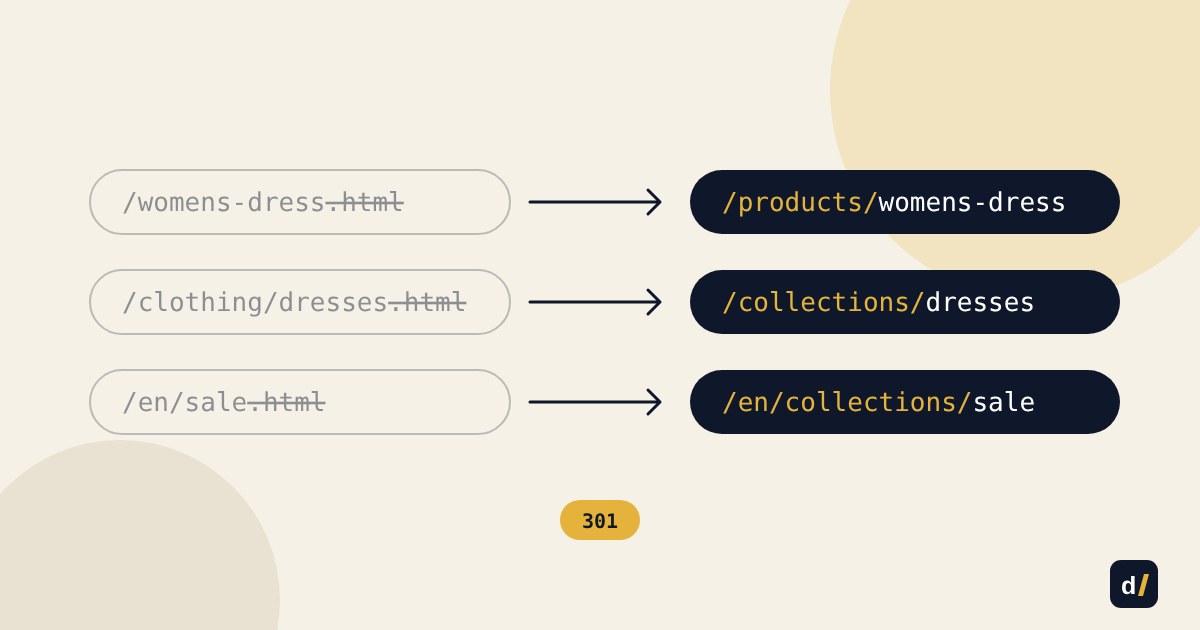
Magento allows almost any URL; Shopify uses fixed prefixes. So practically every URL changes:
| Page type | Magento | Shopify |
|---|---|---|
| Product | /womens-dress.html |
/products/womens-dress |
| Category | /clothing/dresses.html |
/collections/dresses |
| CMS page | /about-us |
/pages/about-us |
| Language version | /en/clothing.html (store view code) |
/en/collections/clothing |
| Filter | /dresses.html?color=red |
/collections/dresses?filter.v.option.color=Red |
The key rule: keep the last part of each URL (the handle). If a product was womens-dress.html, its Shopify handle should be womens-dress. That makes the redirect map easier to build and check, and helps Google connect old pages with new ones faster.
The redirect map, step by step
- Collect every old URL. Export the
url_rewritetable from the Magento database and crawl the site with a crawler such as Screaming Frog. Add URLs from Google Search Console and pages that other sites link to. - Set priorities. Pages with traffic, rankings or backlinks are a must. Empty filter pages and technical URLs can point to their parent collection.
- Match every old URL to a new one. Products and categories can be matched automatically by handle; the rest by hand.
- Import the redirects into Shopify as a CSV in the URL Redirects section of the admin.
- Test before switching the domain. Run through the list of old URLs and check that each returns a single 301 redirect to the right page, with no chains.
Redirects only fire for pages that don't exist
Shopify applies a redirect only when no live page exists at the old path. If you later create a page at the same path, the redirect silently stops working.
Edge cases
- The
.htmlsuffix. Strip it from every handle — and remember that the old.htmlURLs still need redirects to the new ones. - Nested categories. In Magento,
/clothing/dresses/evening.htmland/dresses/evening.htmlcan be the same product under different paths. Every variant must point to a single Shopify URL. - Filters and sorting. URLs with parameters usually aren't worth redirecting one by one — point them to the matching collection.
- Pagination like
?p=2— also to the collection's first page. - Images. If your product images get traffic from Google Images, remember their URLs will change too.
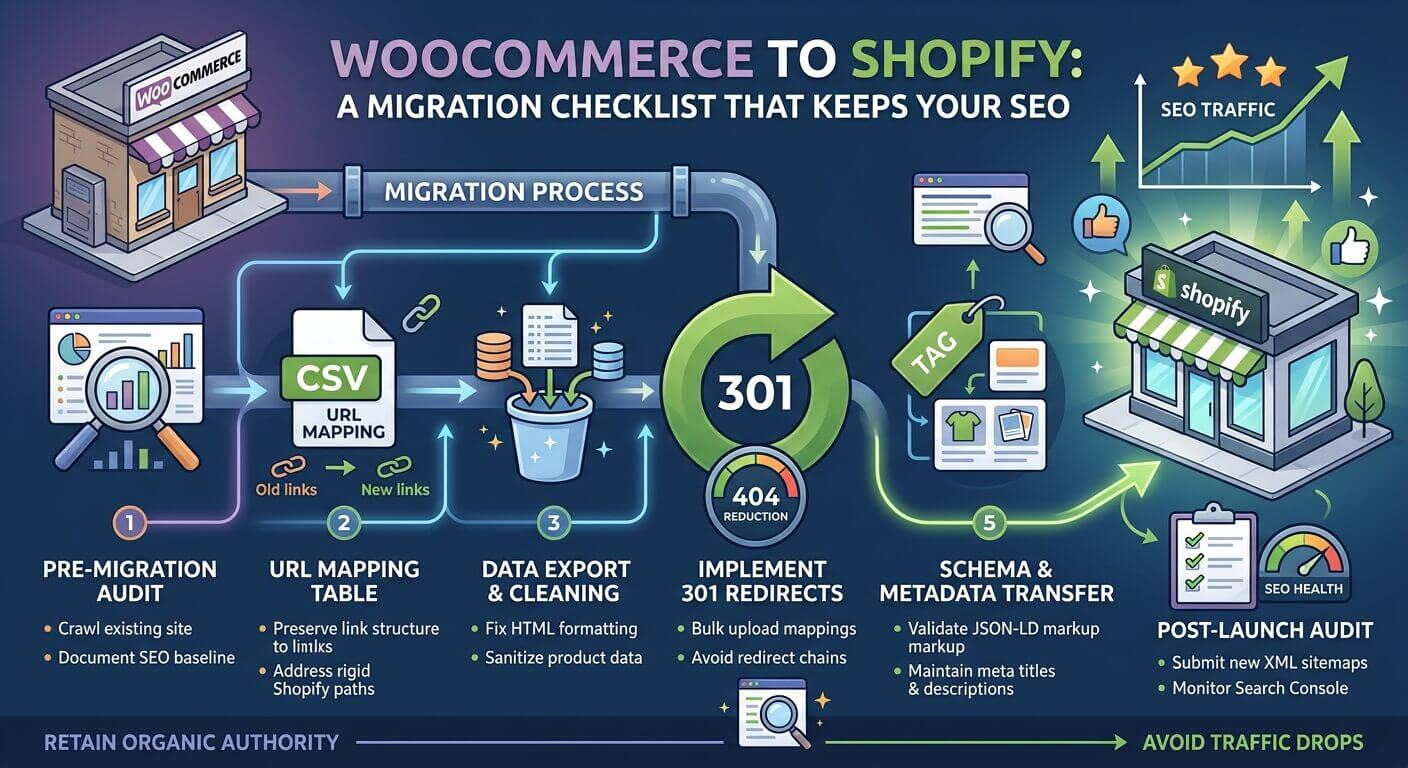
For launch-day checks and the first 30 days, see our WooCommerce migration checklist — those steps are the same whatever platform you're leaving.
After launch
- Submit the new sitemap in Google Search Console.
- Check the 404 report every week for the first month and add any redirects you missed.
- Compare traffic to key pages before and after. A small dip in the first weeks is normal; a steady decline means it's time to look for missing URLs.
- Check speed: a new theme with a dozen apps can be slower than expected — see 10 reasons your store is slow.
Migration checklist
- Attribute and product-structure audit done.
- Shopify data model (variants, metafields, collections) agreed.
- Test import checked on a sample of products and customers.
- All old URLs collected from the database, a crawler and Search Console.
- Redirect map imported and tested.
- Account activation email ready for customers.
- 404 and traffic monitoring set up after launch.
Planning a move from Magento?
We'll assess your store, plan the data migration and build the redirect map — so you move without losing rankings or customers.
Get In Touch
Want to apply this to your store?
Tell us what your Shopify store needs — we'll suggest a solution and estimate the work